
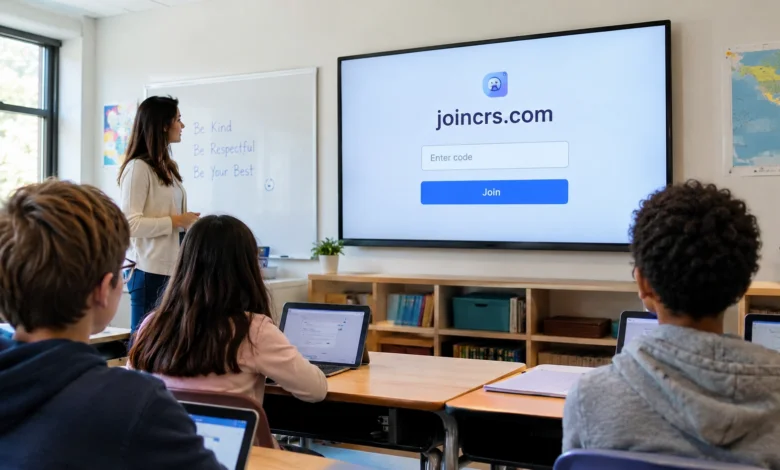
A teacher puts a question on the classroom screen. Instead of waiting for raised hands, students reach for their phones or tablets, enter a short code, and respond. Within moments, answers begin appearing through the lesson’s interactive system. That simple experience explains why many students encounter joincrs com without first knowing what it is.
The important detail is that JoinCRS is not a conventional educational website where students browse courses or create a profile. It functions as a student-facing entry point for Classroomscreen, an online teaching platform built around interactive classroom tools. Classroomscreen’s own help documentation specifically instructs students using remote Poll voting to visit JoinCRS and enter the displayed code.
What Is Joincrs Com?
Joincrs com is the web address associated with the student joining experience for Classroomscreen. When a teacher uses the platform’s remote Poll feature, students can access the question from their own devices by entering a code displayed on the teacher’s screen. Classroomscreen’s current joining page presents a simple code-entry interface and a separate option for teachers to sign in.
That distinction is important because online searches can make the service sound like a standalone learning platform. It is better understood as part of the Classroomscreen ecosystem. Classroomscreen describes itself as an online whiteboard designed for teachers, with tools intended to support classroom management, time management, participation, and lesson activities. The JoinCRS experience handles one specific part of that system: connecting learners to an interactive activity initiated by the teacher.
How JoinCRS Connects Students and Teachers
The basic workflow is deliberately simple. A teacher creates or opens a Classroomscreen session and uses the Poll widget to ask a question. If remote voting is enabled, the classroom display shows instructions for students, including a code. Students then open the joining page on a compatible device and enter that code to reach the live question. Classroomscreen also supports a QR-code route, allowing students to scan rather than type the code manually.
This design solves a familiar classroom problem: participation can become slow when every student must speak individually or when a teacher has to distribute a separate worksheet. A live digital poll can collect responses quickly and provide an immediate visual snapshot of the room. Classroomscreen describes the Poll as useful for formative assessment, checking understanding, gathering opinions, and encouraging discussion.
What Students Actually Do on JoinCRS
For students, the experience is much narrower than the full Classroomscreen platform. They are not expected to build lesson screens, configure classroom widgets, or manage teacher accounts. Instead, they receive a session code or scan the QR code supplied by the teacher and use the joining interface to access the relevant interactive activity.
That limited role is intentional. The teacher remains responsible for creating the activity and controlling the lesson, while students provide responses through their devices. In practical terms, this makes JoinCRS a bridge between the teacher’s projected classroom environment and individual student screens. The approach can be especially useful when a teacher wants every learner to participate simultaneously rather than relying only on volunteers.
Why Teachers Use Interactive Polling
Polling has a straightforward educational advantage: it makes student thinking visible. A teacher asking a question verbally may hear from only the students who are comfortable speaking first. A digital poll can invite the whole class to respond, creating a broader snapshot of understanding or opinion.
Classroomscreen currently supports three Poll question formats: multiple choice, smileys, and True/False. Multiple-choice questions can contain up to five answer options, while the question itself can contain up to 160 characters. Teachers can also choose how responses are displayed, with bar, pie, and doughnut chart formats available.
JoinCRS and Formative Assessment
One of the most useful applications is formative assessment. Unlike a traditional test that may be used to grade students, formative assessment helps a teacher determine what students understand while learning is still taking place. A quick question at the end of an explanation can reveal whether the class is ready to move forward or whether the teacher should revisit the concept.
The value comes from the speed of the feedback loop. A teacher can ask a question, collect responses, inspect the distribution, and adjust the lesson accordingly. Classroomscreen specifically presents its Poll tool as a way to check whether students have understood a lesson and to collect feedback during teaching.
The Wider Classroomscreen Ecosystem
Although students may encounter JoinCRS first, the larger Classroomscreen platform contains a much wider collection of teaching tools. The current platform lists widgets including clocks, timers, calendars, group makers, randomizers, scoreboards, QR codes, PDFs, videos, webcams, traffic lights, sound-level controls, visual timers, and more.
That breadth explains why the student portal should not be confused with the whole service. Classroomscreen is designed to provide teachers with an interactive workspace rather than simply a polling website. A teacher might use a timer for independent work, a group maker for collaborative activities, a randomizer for participation, and a Poll for checking understanding—all within the same broader classroom environment.
How Classroomscreen Has Evolved
Digital classroom tools have changed significantly since the early days of online learning. Initially, many classroom technologies focused on replacing a physical resource with a digital equivalent: a digital worksheet, digital whiteboard, or online presentation. Newer platforms increasingly emphasize interaction, organization, and rapid feedback.
Classroomscreen’s current product positioning reflects that shift. Its website describes the service as an online whiteboard that helps teachers keep students on task, manage time, customize lessons, and engage learners. Its current feature set includes 26 widgets on the Basic plan, with tools covering classroom management, student engagement, lesson management, and gamification.
Does JoinCRS Require a Student Account?
The student joining experience is designed to minimize friction. Classroomscreen’s documentation describes remote Poll voting through JoinCRS as a process where students use the code displayed by the teacher. The core objective is participation in the teacher’s activity rather than creating an independent student profile.
This matters in a classroom because setup time is valuable. If every student had to register, verify an email address, remember a password, and install an application before answering a single question, the technology could become a distraction rather than an aid. The JoinCRS model instead keeps the student interaction focused on the live classroom activity.
Is JoinCRS Free?
The answer depends on which part of the Classroomscreen service is being discussed. Classroomscreen currently offers a Basic account at no monthly cost and says the Basic tier includes all 26 widgets, annotation features, remote Poll voting, three saved name lists, customizable widget-bar layouts, and access to its template library.
There is also a Pro plan. The current pricing page lists Pro at $3 per month when billed annually, or $36 per year, and adds capabilities such as saving and sharing screens, folders, custom backgrounds, unlimited name lists, custom widget themes, and additional background options. School and district organizations can also purchase organization licenses.
What Devices Can Students Use?
Because the student interaction happens through a web-based joining page, the important requirement is a device with a modern web browser and internet access rather than a dedicated classroom application. This can make the model practical across different school environments, where some students may use phones while others use tablets or computers.
However, device access should never be treated as automatic. Schools vary considerably in their technology policies, connectivity, and rules concerning personal devices. A teacher may therefore choose to have students use school-managed tablets or computers instead. The technology can support participation, but the classroom’s own policies and resources ultimately determine how it is deployed.
JoinCRS for In-Person and Remote Learning
The platform is useful beyond a conventional classroom with students sitting at desks. Classroomscreen’s documentation also describes using its tools for distance learning, including remote Poll participation through JoinCRS. Teachers can share their screen during an online lesson while students respond separately through their devices.
Hybrid teaching can benefit from the same principle. Some learners may be physically present while others join remotely, yet both groups can respond to the same question. The technology does not eliminate the instructional challenges of hybrid learning, but it gives teachers another mechanism for keeping participation connected across different locations.
Common Ways Teachers Use the Poll Feature
A teacher does not need to use polling only for formal assessment. A question at the beginning of a lesson can activate prior knowledge, while a mid-lesson question can test whether students are following an explanation. At the end, an exit-style question can help identify concepts that need additional attention during the next class.
The tool can also support classroom discussion. For example, students can vote on an interpretation of a historical event and then explain why they selected it. In a science lesson, a True/False question can expose a misconception before the teacher explains the correct concept. The technology is most useful when the response becomes part of the teaching conversation rather than an isolated screen interaction.
What Makes the System Different From a Traditional Quiz?
A conventional quiz often emphasizes individual completion and evaluation. A live classroom poll can instead function as a conversational teaching tool. The teacher sees a pattern of responses and can immediately ask students to explain their reasoning, compare perspectives, or reconsider an answer.
That difference makes timing particularly important. If a teacher waits until the end of a unit to discover that many students misunderstood a foundational concept, correcting it becomes more difficult. A quick interactive question can expose that problem much earlier. The technology itself does not create better teaching, but it can make useful feedback easier to collect at the moment it matters.
JoinCRS Compared With Other Classroom Tools
Students and teachers may encounter many interactive learning services, including quiz platforms, student-response systems, video-conferencing tools, learning-management systems, and digital whiteboards. JoinCRS occupies a narrower role because it is connected specifically to the Classroomscreen environment rather than trying to become a complete learning-management system.
That specialization can be an advantage. Teachers who already use Classroomscreen do not necessarily need a separate application simply to collect quick Poll responses. On the other hand, educators looking for detailed gradebooks, extensive assignment management, or comprehensive course administration may need additional platforms. The right choice depends on the instructional task rather than the popularity of a particular tool.
Privacy and Responsible Classroom Technology
Any technology involving students should be considered through a privacy and data-minimization lens. The simplest approach is to understand what information students are actually being asked to provide and to avoid collecting unnecessary personal data. A classroom poll about a lesson concept generally presents a different privacy profile from a system that maintains detailed student records.
Teachers and schools should also follow their own technology policies and applicable privacy requirements. A useful principle is to collect only what is needed for the educational purpose, explain how the activity works, and avoid placing sensitive information into public or shared fields. Students should also know when participation is anonymous or identifiable if that distinction affects the activity.
What to Do When JoinCRS Does Not Work
The first troubleshooting step is surprisingly simple: confirm that the teacher’s session is active and that the student is using the current code. A temporary or incorrect code can prevent a student from reaching the intended activity even when the website itself is working normally.
Next, check the internet connection and browser. Refreshing the page, opening the joining address again, or switching to another supported browser can resolve basic loading problems. If the teacher has displayed a QR code, scanning it can also eliminate typing errors. When the problem affects the entire class rather than one student, the teacher should check the Classroomscreen session and the Poll’s remote-voting settings.
What Teachers Should Prepare Before Class
Technology works best when it is prepared before students need it. Teachers should create the Poll question in advance, test the screen, decide whether responses should be visible, and consider how much time students will receive. A clear question with a small number of meaningful answer choices generally works better than a complicated prompt squeezed into a live activity.
It is also useful to have a backup plan. Classroom internet access can fail, devices can run out of battery, or a session can behave unexpectedly. A teacher who already knows the question they want to ask can switch to verbal responses, a whiteboard, or another method without losing the lesson’s instructional objective.
The Future of Interactive Classroom Technology
The direction of classroom technology is moving toward systems that combine presentation, management, interaction, and feedback instead of forcing teachers to switch between many disconnected applications. Classroomscreen’s continued development of widgets, templates, sharing features, and interactive learning tools reflects that broader trend.
Artificial intelligence is likely to add another layer to this evolution. Future classroom platforms may increasingly help teachers generate questions, adapt activities, summarize responses, or identify patterns in student participation. Yet the central educational challenge will remain human: teachers still need to decide what students should learn, why a question matters, and what to do with the answer.
Key Takeaways
Joincrs com is best understood as the student-facing joining point connected to Classroomscreen rather than as an independent online school or course marketplace. Students can use it to access live Poll activities created by their teacher, typically by entering a session code or scanning a QR code. Classroomscreen’s official documentation explicitly describes this workflow for remote voting.
The broader platform provides teachers with a large collection of classroom-management and engagement tools. Current Classroomscreen information lists 26 widgets on its Basic plan, including Poll, Timer, Group maker, Randomizer, QR Code, Scoreboard, and other tools. The Basic plan is currently free, while Pro adds saving, sharing, organization, and customization features.
For students, the main benefit is simplicity. Instead of navigating a complicated learning-management system, they can respond to a teacher’s live activity through a straightforward joining process. For educators, the bigger opportunity is rapid feedback: a short question can reveal understanding, surface misconceptions, and create a starting point for discussion.
Frequently Asked Questions About Joincrs Com
What is JoinCRS used for?
JoinCRS is used as a student access point for interactive Classroomscreen activities, particularly remote Poll voting. Students receive a code from their teacher and use the joining page to access the activity.
Is JoinCRS the same as Classroomscreen?
Not exactly. JoinCRS is part of the Classroomscreen ecosystem and serves the student joining function, while Classroomscreen itself is the broader online teaching platform containing widgets for classroom management, engagement, timing, and lesson activities.
How do students join a Classroomscreen poll?
Students can visit the JoinCRS joining page and enter the code displayed by the teacher. Classroomscreen also supports QR-code access, allowing students to scan a code instead of typing it.
Do students need to download an app?
The JoinCRS experience is browser-based. Students access the joining page through a web browser rather than needing a dedicated JoinCRS application.
Is Classroomscreen free?
Classroomscreen currently offers a Basic plan for $0 per month. The company says the Basic plan includes all 26 widgets and remote Poll voting, while Pro provides additional features and is currently listed at $3 per month when billed annually.
What can teachers use Classroomscreen for besides polling?
Teachers can use tools such as timers, clocks, group makers, randomizers, QR codes, scoreboards, sound-level controls, images, videos, PDFs, and other widgets. The platform is designed to support classroom management and interactive teaching rather than polling alone.
What should I do if my JoinCRS code does not work?
First confirm that the code is current and was copied correctly. If the problem continues, check the internet connection, refresh the browser, try another browser or device, and ask the teacher to confirm that the relevant Classroomscreen session and remote voting option are active.
Conclusion
The apparent mystery surrounding joincrs com disappears once its role in the Classroomscreen ecosystem is understood. It is not designed to be a conventional education portal filled with courses, accounts, and student dashboards. Instead, it provides a simple bridge between a teacher’s interactive classroom activity and the devices students use to participate.
That simplicity is its most important feature. In a busy classroom, every unnecessary login, installation, or technical step can take attention away from learning. A short code, a browser, and a live question can create a much faster path from instruction to participation. Classroomscreen’s continuing development of interactive widgets and classroom tools suggests that this kind of integrated teaching environment will remain relevant as schools balance digital convenience with meaningful pedagogy.
For students who have been told to visit JoinCRS, the practical lesson is straightforward: use the current code supplied by your teacher, follow the joining instructions, and participate in the activity. For educators, the greater opportunity is to use the platform purposefully—asking questions that reveal understanding, encourage discussion, and inform what happens next. As classroom technology continues to evolve, tools that make meaningful interaction easier are likely to matter far more than tools that simply add another screen.